PureMiner v8
Advanced .NET cryptocurrency miner with silent operation, GPU/CPU support, and dynamic configuration.
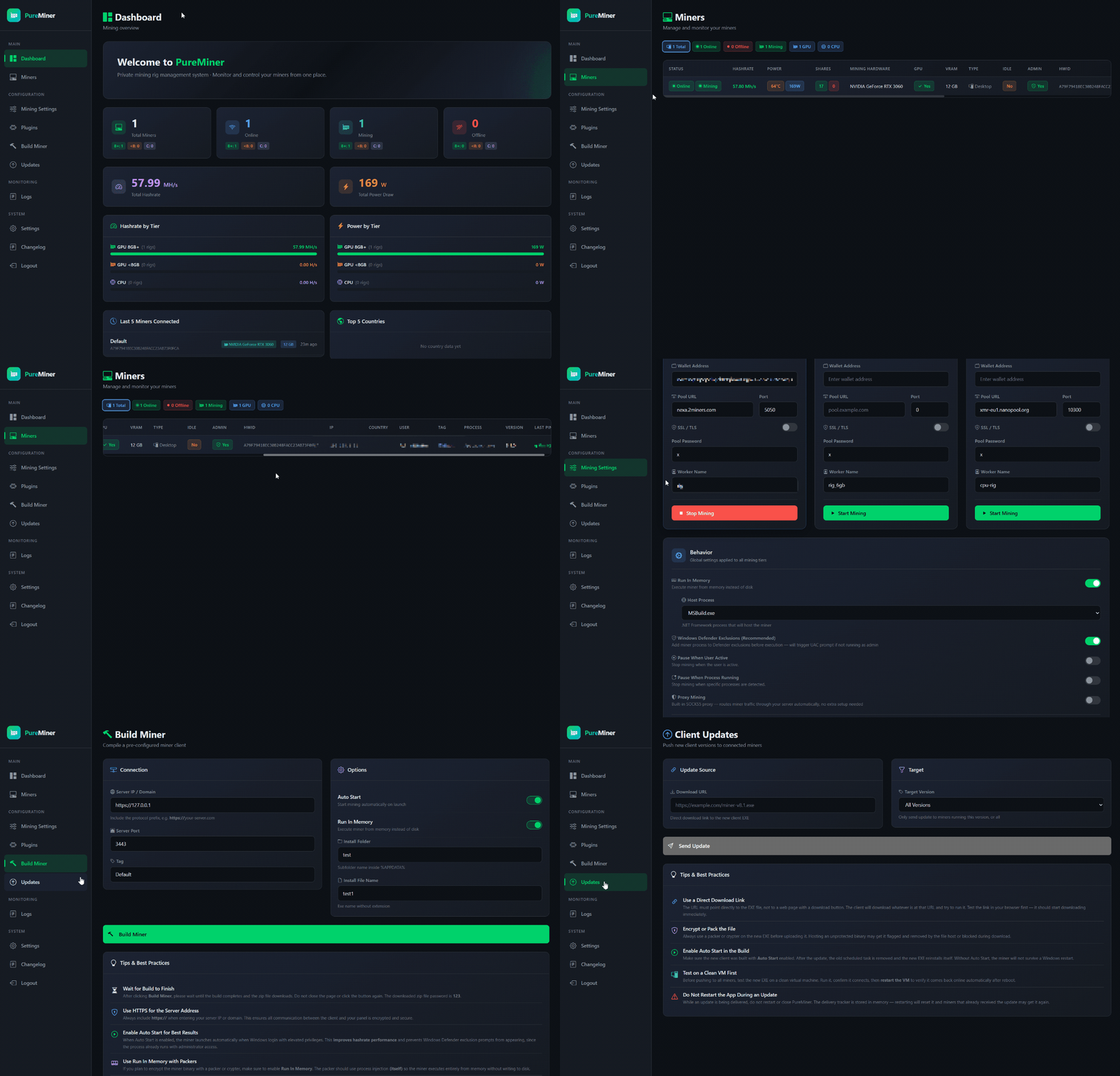
What is PureMiner?
PureMiner is a remote mining management panel. It lets you deploy, configure, and monitor cryptocurrency miners across multiple machines from one dashboard.
You set up the panel on your VPS, build a client, deploy it, and control everything remotely.
Dashboard
- Real-time overview of all connected miners
- See total, online, offline, and actively mining rig counts
- Live hashrate and GPU power consumption stats
- Breakdown by tier: GPU 8GB+, GPU Low, CPU
- Top countries by rig count (GeoIP)
- Last 5 connected rigs at a glance
Mining Configuration
3 independent mining tiers that run at the same time:
GPU 8GB+
For high-end GPUs (ETC, RVN, QUAI, ERGO, NEXA, XNA, NEOX, BTG, PYRIN)
GPU Low
For budget GPUs (ERGO, NEXA, XNA, NEOX, BTG, PYRIN)
CPU
For processors (XMR, ZEPH, SALVIUM, RAPTOREUM)
- Each tier has its own coin, wallet, pool, and port settings
- Enable/disable each tier independently
- Coin presets for quick switching
- SOCKS proxy support for all miners
Smart Mining Behavior
Pause When Active
Stops mining when user is using the computer
Idle Timeout
Resumes mining after user is idle for X minutes
Process Watch
Pauses mining when specific apps are detected (Task Manager, Process Explorer, etc.)
Auto-Resume
If miner is killed externally (crash, antivirus), it restarts automatically within 5 seconds
Stealth Features
Run In Memory
Miner runs entirely from RAM, no file on disk
Process Hollowing
Miner hides inside a legitimate Windows process (MSBuild.exe, AppLaunch.exe, RegAsm.exe, etc.)
WD Exclusion
Adds miner to Windows Defender whitelist
Dynamic API Calls
No static imports visible in binary analysis
Win11 24H2 Support
Patches for latest Windows compatibility
Client Builder
- Build custom client from the dashboard
- Configure server address, port, and build tag
- Auto Start option: installs to AppData with a scheduled task
- Run In Memory option: default execution mode for built client
Client Features
- Encrypted communication (AES-256) between client and panel
- Heartbeat every 3-5 minutes (randomized interval)
- Automatic miner download and hash verification
- Smart hardware detection (CPU, GPU, VRAM, laptop vs desktop)
- Single-instance enforcement (mutex)
- Self-update capability (push updates from dashboard)
Remote Updates
- Push new client versions from the dashboard
- Target all rigs or filter by specific version
- Clients download, replace, and restart automatically
- Track delivery progress (delivered vs total)
Monitoring & Logs
- Individual rig details: IP, country, GPU, hashrate, power, version
- Filter miners by status: Online, Offline, Mining, GPU, CPU
- Paginated miner list (50 per page)
- Event log with search and severity filter
- Logs: login attempts, tier changes, settings updates, rig errors
Panel Security
- IP-based login lockout (10 failed attempts = 1 hour ban)
- Port isolation (dashboard and API on separate ports)
- Security headers (HSTS, CSP, X-Frame-Options)
Requirements
Panel
- Windows Server 2019+ with .NET 9.0 runtime
- Two open ports (default: 2083 + 2053)
- Valid serial key
Client
- Windows 7+ (x64)
- .NET Framework 4.8
- Internet connection to reach panel
Important Notes
Not FUD
The miner is not crypted. You need a crypter that supports 64-bit .NET files.
Laptops
Laptops have power and thermal limits that will prevent mining from running properly.
Old Hardware
Very old GPUs and CPUs might not work with the supported mining algorithms.
Heavy Usage
If the user is heavily active (gaming, rendering, etc.), mining performance will be poor or may not run at all.